In preparation for the master we, Sarah and I, have been using slack as our main communications platform. This, as it turns out, has been incredibly helpful, due to the app integration.
Also I didn't want to use facebook chat. Not for "official" business.
Basically, I've set it up so that Trello, BitBucket and Google Calendar are all linked to Slack, and send activity logs to different channels. This makes sure that both of us know exactly what is going on at all times, and that makes communication a lot easier. No need to ask someone to do something, or when a deadline is due, just go to the appropriate channel and see if it's there. Whenever something happens I get a notification.
For example: Sarah pushes an update to BitBucket and moves a task from "To Do" to "In Progress" on Trello. I get immediate notifications from slack that these things are happening, and, without exchanging a word, I know Sarah has finished something and started work on another.
However, it's not just about real-time updates, but also keeping a log of things. This is so that we, in a years time, can look back and show exactly what we did at which point in time, what we discussed during meetings, which builds were shared,... pretty much everting. This can be used during presentations or to show people who would be interested in our creative process.
Showing posts with label Game Design. Show all posts
Thursday, June 1, 2017
Using twine for text based games.
| Complete passage structure. |
PLAY THE GAME HERE
The cool thing about twine, that I've noticed, is that it's got plenty of coding potential. This was mostly to explore these possibilities. Below you can see some of the structure involved.
![]() |
| A randomly generated passage. |
Adapted from the story written for the storytelling cource, which you can find here:
Go to the full story.
Wednesday, October 5, 2016
JamToday 2016 | C-Mine Crib
my second GameJam, I think this one worked out way better than the first one. That meaning that we actually managed to make a game. Always a plus.
Our game was called Gravity Assist and, trying to keep in with the theme of maths, was about using gravity and command-line style controls. This gives the 'space-sim' a very challenging edge.
We had a good team.
Our game was called Gravity Assist and, trying to keep in with the theme of maths, was about using gravity and command-line style controls. This gives the 'space-sim' a very challenging edge.
|
|
We had a good team.
Tuesday, August 30, 2016
CommandLine v4.0 | Getting into it.
After messing with different systems for commands and asking help where I can, I've found that the best solution is to assess my own ability and keep things real. Keep it understandable. All the systems we (My friend and I) have come up with are essentially more complicated versions of checking if a word that was input by the user matches the next word of a command.
As such I started work on v4.0 with the intention of making it a understandable, rigid system, and start work on the rest of the game to see how it plays. Surprisingly it's the most promising command system so far, partly because I can understand it in it's entirety.
The work continues.
As such I started work on v4.0 with the intention of making it a understandable, rigid system, and start work on the rest of the game to see how it plays. Surprisingly it's the most promising command system so far, partly because I can understand it in it's entirety.
The work continues.
Monday, August 29, 2016
CommandLine | Day 9
Time flies.
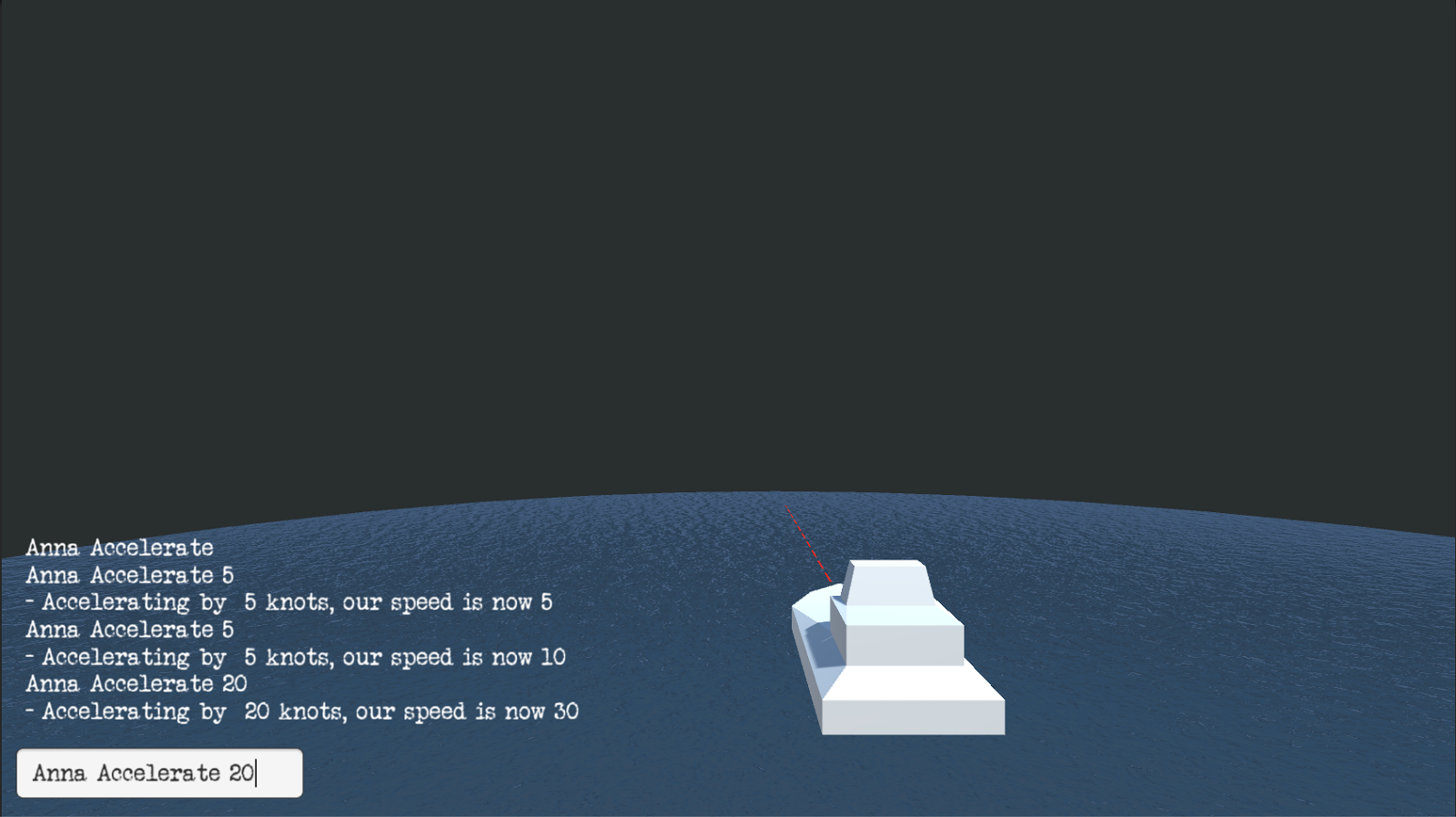
So since the pitch I wrote over a week ago I've been working on making a quick proof of concept.
First was my own attempt, which I quickly realised was very inefficient. I was satisfied with my UI and interface, and the concept was slowly taking shape: a battleship game that was more of a crew simulator, with the player issues commands and talks to his/her crew by typing them into a command prompt, much like ye olde computers. However, the scale of the project I envisioned became quite daunting, and I quickly asked my friend Nicolas, who is a way better programmer than me, for help.
| CommandLine v1.0 |
It's in this version that most experimentation happened, like keyword-based commands vs rigid strings, something which I may still want to implement;
The impressive thing here is that it would get the actual names of functions from a 'commands' script, and it would check the string entered in the InputField to those. the code itself became the list of commands.
After a few days of work I started anew, fresh and with the knowledge I gained from v1.0, I started work on v2.0 with a focus on getting the commands read through lists and the unity inspector. A completely different approach to v1.0.
By making a class 'words' and it having a list of itself I could simply make branches of words, making a sentence. Dialogue or command could then be checked and (this is where I realised the difficulty of what I was trying to do) run a function with some variables.
This worked very nicely, but at this point I just asked Nicolas to go ahead and write me some code, which he did almost instantly.
That brings us to the current v3.0, which is based on Nicolas' code and that I will be building upon to get the command and dialogue system up and running. Something about tress and delegates and stuff. SuperTree.
Here's to collaborations.
Saturday, August 20, 2016
Pitch: Text-Based submarine battle
You're the commander of a sub fighting an under-water war. You must
use commands to, well, command your ship, and communicate with your crew
to take out the enemy ship. This to make information gathering and the giving of commands integral part of the game.
Modern games where you are supposed to fly large aircraft or warships with a crew it's played as if you're all alone, with hotkeys and your mouse to aim and fire all weapons. This game gives you a crew to manage and give orders to.
2 player, competitive.
Screen is nothing but a text prompt and a 'sonar' radar screen that you can 'pulse' to get the locations of objects around you.
List commands
- accelerate/decelerate
- rotate (degrees*)
- scout
- locate
- fire (weapon)
Accelerate 10
- accelerating from 40 to 50 knots.
Scout
- Enemy ship 30*, 200m
Rotate +60
- rotated +60*
Scout
- Enemy ship 90*, 210m
Locate Engine
- Engine located
Locate firing bay
- Failed to locate firing bay
- Enemy Fired 3 Torpedoes, 205m, 6 sec to impact
Commands
- accelerate/decelerate
- rotate (degrees*)
- scout
- locate
- fire (weapon)
Decelerate 20
- Decelerating from 50 to 30 knots
Rotate -90
- Rotating -90*
- 1 Enemy torpedo hit, 2 missed
- -20 health to hull
Scout
- Enemy ship 180*, 250m
Rotate+90
- Rotating +90*
Scout
- Enemy Ship 90*, 260m
Locate Hull
- Enemy Hull Located
Fire Torpedoes 3, Hull
- Firing 3 Torpedoes at enemy hull, 255m, 6.5 sec to impact
Accelerate 20
- Accelerating from 30 to 50 knots
Scout
- Enemy Ship 100*, 250m
- 2 torpedoes hit Enemy hull, 1 miss
and so on and on
Modern games where you are supposed to fly large aircraft or warships with a crew it's played as if you're all alone, with hotkeys and your mouse to aim and fire all weapons. This game gives you a crew to manage and give orders to.
2 player, competitive.
Screen is nothing but a text prompt and a 'sonar' radar screen that you can 'pulse' to get the locations of objects around you.
Example Game:
List commands
- accelerate/decelerate
- rotate (degrees*)
- scout
- locate
- fire (weapon)
Accelerate 10
- accelerating from 40 to 50 knots.
Scout
- Enemy ship 30*, 200m
Rotate +60
- rotated +60*
Scout
- Enemy ship 90*, 210m
Locate Engine
- Engine located
Locate firing bay
- Failed to locate firing bay
- Enemy Fired 3 Torpedoes, 205m, 6 sec to impact
Commands
- accelerate/decelerate
- rotate (degrees*)
- scout
- locate
- fire (weapon)
Decelerate 20
- Decelerating from 50 to 30 knots
Rotate -90
- Rotating -90*
- 1 Enemy torpedo hit, 2 missed
- -20 health to hull
Scout
- Enemy ship 180*, 250m
Rotate+90
- Rotating +90*
Scout
- Enemy Ship 90*, 260m
Locate Hull
- Enemy Hull Located
Fire Torpedoes 3, Hull
- Firing 3 Torpedoes at enemy hull, 255m, 6.5 sec to impact
Accelerate 20
- Accelerating from 30 to 50 knots
Scout
- Enemy Ship 100*, 250m
- 2 torpedoes hit Enemy hull, 1 miss
and so on and on
Tuesday, August 9, 2016
Nothing but exploration.
NOTHING ELSE begun as a game idea from my friend: a computer program has to go around and survive. Things like finding a power source, code to eat, data to consume, and output to place. That kinda thing. From that idea and making a quick prototype I started to think about exploration games; Why do they have maps, or a preset world at all? Randomly generated terrains work, but they stay the same, you can return to the same old, already discovered place.
So NOTHING ELSE is only about exploring new places. The world that exists is the screen, anything outside of your vision and intractable area gets deleted, and if you move the world gets generated around you. You could move down a hallway, turn around, and have an open area to move around, or be stopped by a dead end. Go in circles and keep seeing new terrain.
Download here: https://drive.google.com/open?id=0B0OMXC3OytI5VXlHS3NQY0pSajg
So NOTHING ELSE is only about exploring new places. The world that exists is the screen, anything outside of your vision and intractable area gets deleted, and if you move the world gets generated around you. You could move down a hallway, turn around, and have an open area to move around, or be stopped by a dead end. Go in circles and keep seeing new terrain.
Download here: https://drive.google.com/open?id=0B0OMXC3OytI5VXlHS3NQY0pSajg
Subscribe to:
Posts (Atom)